
Why do you need a LoRaWAN server when purchasing a LoRaWAN gateway?
Release time:
2024-08-24
Why do you need a LoRaWAN server when purchasing a LoRaWAN gateway?
The editor often encounters customers making purchases. LoRaWAN gateway At that time, there was confusion about how to deploy it locally.
A LoRaWAN gateway directly forwards the received LoRaWAN data to the LoRaWAN server, and this process requires the LoRaWAN server. This is because LoRaWAN employs a star‑topology wireless network architecture that includes end nodes, gateways, a network server, and an application server—forming a hierarchical flow from LoRaWAN end nodes, through LoRaWAN gateways and the LoRaWAN server, to the cloud platform. It is not like a household refrigerator, which can be used immediately after being plugged in.

So today, we’ll walk you through how to set up your own LoRaWAN server.
Setting up a LoRaWAN server involves several steps. Below is a detailed setup guide:
I. Preliminary Preparations
Understanding LoRaWAN Technology:
Gain a fundamental understanding of LoRaWAN technology, including its underlying technical principles, network architecture, and protocol specifications.
Define the requirements for the LoRaWAN network, such as coverage area, number of devices, and communication frequency.

Select the server platform:
You can choose an open-source LoRaWAN network server, such as ChirpStack. ChirpStack is a widely used open-source server that supports multiple protocol stacks and gateway devices, and it offers a simple, user-friendly web interface.
Consider the server’s configuration and installation steps, as well as its stability and community support.
Prepare the hardware and software:
Prepare a server hardware configuration with moderate performance and high stability.
Install a suitable operating system, such as Ubuntu or Debian, which typically offer robust support for open-source software.
If you choose to use Docker container technology, you will also need to install Docker.
II. Setup Steps
Operating System Configuration:
Install and configure the operating system on the server, ensuring system stability and the presence of necessary software packages.
If SSH or root login is disabled by default on the server, you’ll need to enable the SSH service and set a password for the root account to manage the server remotely.
Install Docker (if you choose to use it):
Install Docker using the official installation script or your system’s package manager.
Configure the Docker network to ensure network connectivity among containers and between containers and the host machine.
Obtain and deploy ChirpStack:
Obtain the required configuration files and software packages from ChirpStack’s official repository or other trusted sources.
Deploy ChirpStack services using Docker Compose or another container orchestration tool.
Configure ChirpStack’s network parameters, device parameters, and other settings according to actual requirements.
Configure the LoRaWAN gateway:
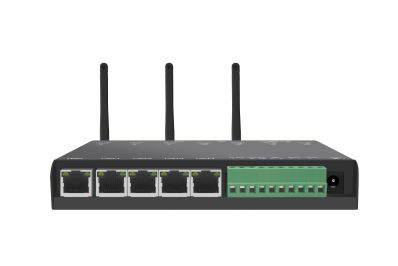
Connect the LoRaWAN gateway to the network and configure its network parameters, such as the IP address and port number.
Add gateway information in ChirpStack and ensure that the gateway successfully registers with the server.
Register and configure the device:
Create a device configuration profile in ChirpStack and assign a unique identifier to each device, such as DevEUI, AppEUI, and AppKey.
Configure the device’s LoRaWAN parameters, such as frequency and spreading factor.
Testing and Optimization:
Perform network testing to ensure that the device can successfully connect to the LoRaWAN network and transmit data.
Optimize network configurations and device parameters based on test results to enhance the reliability and stability of data transmission.
III. Post-Implementation Maintenance
Monitoring and Logging:
Regularly monitor the server’s operational status and network performance to ensure stable system operation.
View and analyze log files to promptly identify and resolve issues.
Security Hardening:
Secure the servers and gateways to prevent unauthorized access and data leakage.
Regularly update system and application security patches to ensure system security.
Expansion and Upgrade:
Expand the coverage and device capacity of the LoRaWAN network based on business requirements.
Stay updated on the latest developments of open-source projects like ChirpStack, and promptly upgrade your server software to take advantage of new features and performance improvements.
By following the steps outlined above, you can successfully set up a LoRaWAN server based on ChirpStack and deploy your own LoRaWAN network. Note that the specific setup procedures may vary depending on the server platform, gateway devices, and development environment you choose.
Therefore, in practice, you should refer to the latest official documentation or community guidelines when performing operations.
MORE NEWS
Contact Us
Tel:+86-189-23711266 400-1273-421
E-mail:liulin@rf-md.com
Shenzhen office: 506-509, zone 1, block B, Huayuan science and Technology Innovation Park, No. 168, Baoyuan Road, Xixiang, Bao'an District, Shenzhen
Changsha Branch: 21d, building F4, Lugu enterprise Plaza, No. 27, Wenxuan Road, Yuelu District, Changsha

Follow us
-

E-mail:
yangyalan@rf-md.com
-

Tel:
+86-755-23284193
-
